ニュース Blox Fruits – すべての有効な引き換えコード 2025 年 1 月

Blox Fruits – すべての有効な引き換えコード 2025 年 1 月

著者 : Isabella アップデート : Jan 08,2025

Blox Fruits は、経験値 2 倍ボーナスや属性リセットなどの寛大な報酬をプレイヤーに提供し続け、引き換えコードを通じて定期的に配布されます。これらの引き換えコードは、開発者によって Facebook ページや Discord チャネルなどのソーシャル メディア プラットフォームに投稿されます。 Blox Fruits は、そのアニメ スタイルで Roblox プレイヤーに深く愛されており、2019 年の発売以来、7 億 5,000 万人以上のプレイヤーがいて、330 億回以上検索されています。

利用可能なすべての引き換えコードのリスト

このゲームの人気が続いているのは、革新的な機能や仕組みを定期的に追加する開発者の継続的な努力のおかげです。また、新しいブロックス フルーツ引き換えコードも随時リリースされており、プレイヤーはこれらの引き換えコードを使用して経験ボーナス、属性リセット、その他のさまざまなゲーム内アイテムを引き換えることができます。 2024 年 6 月までに利用可能なすべての引き換えコードは次のとおりです:

KITT_RESET – 無料の属性リセット SUB2OFFICIALNOOBIE – 20 分で 2 倍の経験値を獲得 ADMINHACKED – 無料の属性リセット ADMINDARES – 20 分で 2 倍の経験値を獲得 AXIORE – 20 分で 2 倍の経験値を獲得 チャンドラー – ジョーク引き換えコード (0 ベリー) ENYU_IS_PRO – 20 分で 2 倍の経験値を獲得 BIGNEWS – ゲーム内タイトル「BIGNEWS」を入手 BLUXXY – 20 分で 2 倍の経験値を獲得 SUB2UNCLEKIZARU – 無料属性リセット TANTAIGAMING – 20 分で 2 倍の経験値を獲得 THEGREATACE – 20 分で 2 倍の経験値を獲得 FUDD10 – 1 ベリー FUDD10_V2 – 2ベリー JCWK – 20 分で 2 倍の経験値を獲得 SUB2CAPTAINMAUI – 20 分で 2 倍の経験値を獲得 SUB2DAIGROCK – 20 分で 2 倍の経験値を獲得 SUB2FER999 – 20 分で 2 倍の経験値を獲得 SUB2GAMERROBOT_EXP1 – 3 0 分で 2 倍の経験値を獲得 KITTGAMING – 20 分で 2 倍の経験値を獲得 MAGICBUS – 20 分で 2 倍の経験値を獲得 STARCODEHEO – 20 分で 2 倍の経験値を獲得 STRWHATMAINE – 20 分で 2 倍の経験値を獲得 SUB2GAMERROBOT_RESET1 – 無料の属性リセット SUB2NOOBMASTER123 – 20 分で 2 倍の経験値を獲得

これらの引き換えコードには明確な有効期限がなく、各引き換えコードはアカウントごとに 1 回のみ使用できます。

Blox Fruits で引き換えコードを引き換える方法は?

引き換えコードを引き換える手順は次のとおりです:

  1. Roblox ランチャーで Blox Fruit を起動します。
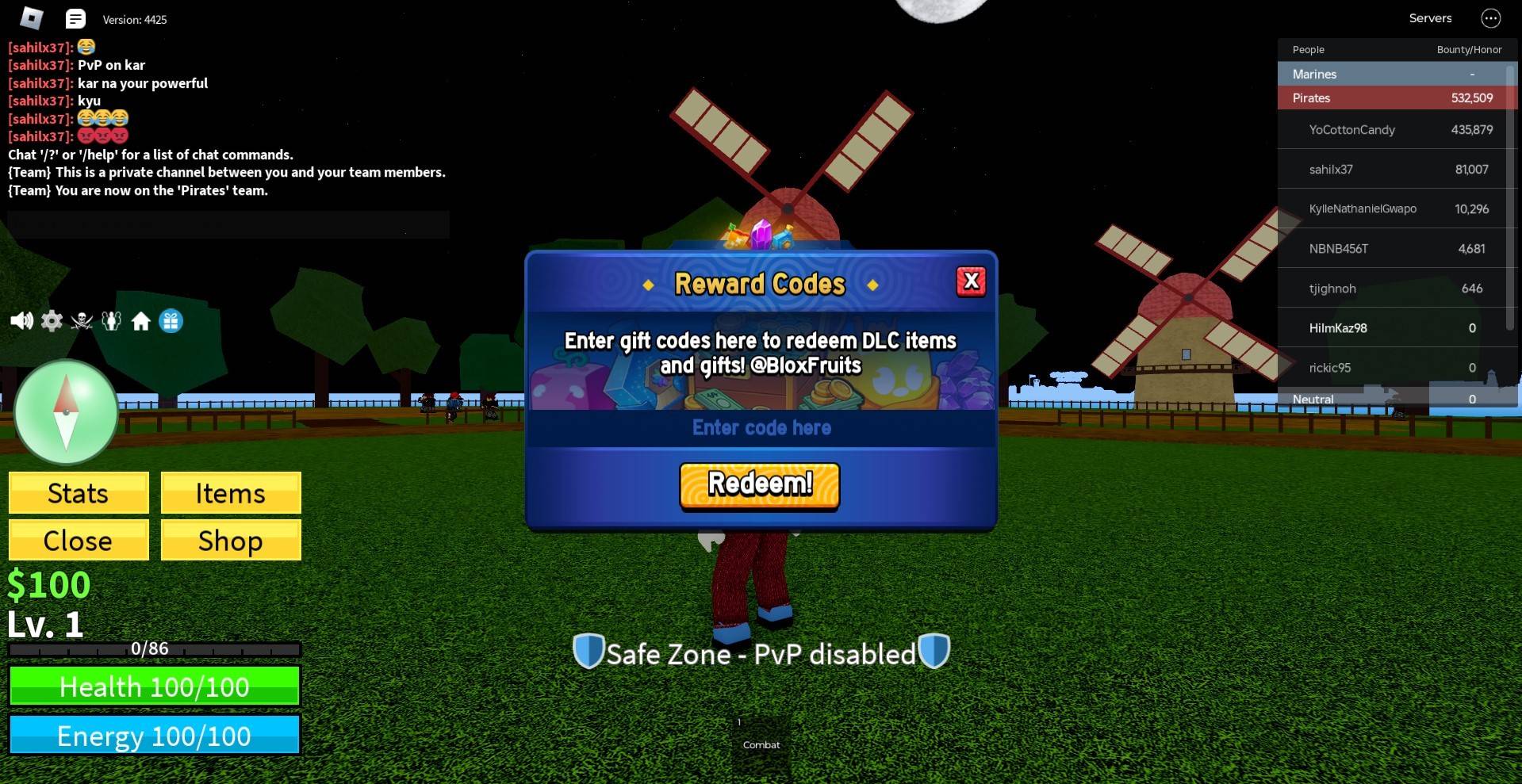
  2. 画面の左上隅にある青と白のギフトボックスのアイコンをクリックします。
  3. 上記の引き換えコードのいずれかをテキスト ボックスに入力します。
  4. 報酬はすぐに配布されます。

Blox Fruits兑换码

引き換えコードが無効ですか?理由を確認してください

上記の引き換えコードのいずれかが無効な場合は、次の理由が考えられます:

  • 有効期限: 各引き換えコードの正確な有効期限を必ず確認しますが、一部の引き換えコードには開発者が指定した有効期限がありません。この場合、有効期限のない一部の引換コードはご利用いただけない場合がございます。
  • 大文字と小文字の区別: 引き換えコードは完全に大文字と小文字を区別して記述してください。つまり、各引き換えコードで正しい大文字と小文字を使用していることを確認してください。最良の結果を得るには、引き換えコードをコピーして引き換えウィンドウに直接貼り付けることをお勧めします。
  • 引き換え制限: 特に明記されていない限り、各引き換えコードはアカウントごとに 1 回のみ引き換えることができます。
  • 使用制限: 一部の引き換えコードは、特定の回数のみ使用できます。特に明記されていない限り。
  • 地域制限: 一部の引き換えコードは、特定の地域でのみ引き換えることができます。たとえば、米国で機能する引き換えコードはアジアでは機能しない可能性があります。

PC で Blox Fruits をプレイするには BlueStacks を使用し、キーボードとマウスを使用して大画面で 60 FPS の遅延のないゲーム体験を得ることが推奨されます。

最新記事

もっと
Shadow of the Monkey King: The PS5 Patch That Shakes the System – 93GB Download Warning The highly anticipated Shadow of the Monkey King—officially titled Wukong—has dropped a major performance patch for PlayStation 5, promising smoother gameplay, enhanced visuals, and improved load times. But fans are bracing for a shock: the update weighs in at a massive 93GB. What’s New in the Patch? The latest patch brings significant improvements to the game’s already impressive technical foundation: Ray Tracing Enhancements: More realistic lighting, reflections, and ambient occlusion across all key environments—from the misty peaks of the Five Elements Mountains to the fiery depths of the Underworld. Framerate Stability: Fixed stuttering issues in high-combat sequences, ensuring a buttery-smooth 60fps experience in Performance Mode. Reduced Load Times: Level transitions and fast-travel now load up to 40% faster, thanks to optimized data streaming and expanded SSD utilization. AI & NPC Improvements: Enemies react more dynamically to player actions, and non-combat NPCs now display more lifelike behaviors and dialogue variations. The 93GB Download: Why So Big? While the patch delivers on quality, the 93GB size has sparked mixed reactions online. According to a dev note from Game Science: “This update includes over 100GB of new assets, including high-resolution textures, additional animation cycles, and expanded audio libraries. The bulk of the data is dedicated to preserving the game's artistic integrity and enabling future mod support through a new asset streaming framework.” Some users have pointed out that the base game is only ~40GB, meaning the patch nearly doubles the total storage requirement. What Should Players Do? Ensure You Have 100GB+ Free Space: The PS5 needs at least 100GB of free space for the full patch installation, including temporary files. Consider Using a Fast SSD: The patch’s large size and high-speed data transfer mean a fast external SSD or internal NVMe drive is recommended for optimal download and installation times. Download During Off-Peak Hours: With many players updating simultaneously, expect slower speeds during peak times. Fan Reactions The community is split: “93GB for a game that already looked gorgeous? I’ll take the upgrade.” – @PS5GamerPro “I’m not mad… I’m just disappointed my 500GB PS5 now has 100GB of ‘just for one game’.” – @GamingWithGrit “It’s worth it for the ray-traced rain in the Jade Emperor’s palace.” – @MonkeyKingFanatic Final Thoughts While the 93GB download is a hefty ask, the performance and visual gains make it a worthwhile investment for fans of Wukong. As one Reddit user put it: “It’s not a patch. It’s a revelation. Just… maybe start downloading on a weekend.” So, if you're ready to dive back into the mythic journey of Sun Wukong, grab your staff, clear some storage, and prepare for a transformation—both on screen and on your PS5’s hard drive. 🔥 Wukong has risen. But so has your download bar. 読む