Black Ops 6 ゾンビで 4 ページの断片を見つけて使用する方法
Call of Duty: Black Ops 6 のゾンビ モードとイースター エッグはプレイヤーに愛されていますが、メインの「デス フォートレス」ミッションのステップを完了するのは少し難しい場合があります。この記事では、Black Ops 6 ゾンビ モードでこれら 4 つのページ フラグメントを見つけて使用する方法を説明します。
目次
Black Ops 6 ゾンビ モードの「Death Fortress」で 4 つのページ フラグメントを見つける Black Ops 6 ゾンビ モードのページ フラグメントはどこにありますか ページ フラグメントの使用方法
Black Ops 6 ゾンビ モードのデス フォートレスで 4 つのページの断片を見つけます
Death Fortress は、Black Ops 6 のゾンビ モードを、Black Ops 4 と Vanguard のより大きく深いストーリーに結び付けます。マップのメイン クエストの 1 つのステップでは、プレイヤーは 4 つのページの断片を見つけてマップの周囲のシンボルを明らかにする必要があります。ただし、これらのページの断片は見つけるのが難しく、多くの場合不具合があるため、ゲーム内に物理的に存在しインタラクティブであるにもかかわらず、見ることができません。これらのフラグメントが正しく生成されていることを確認するには、ページ フラグメントを検索する前に次の手順を実行してください:
「デスフォートレス」で「エキゾチック武器アップグレードマシン」を開き、ダンジョンの閉じたドアを操作し、クラフト教授に話しかけます。これらの2つの手順を完了した後、ページのフラグメントが以前にゲームに表示されなかった場合は、これで表示されるはずです。
Black Ops 6 ゾンビ モードのページ フラグメントの場所
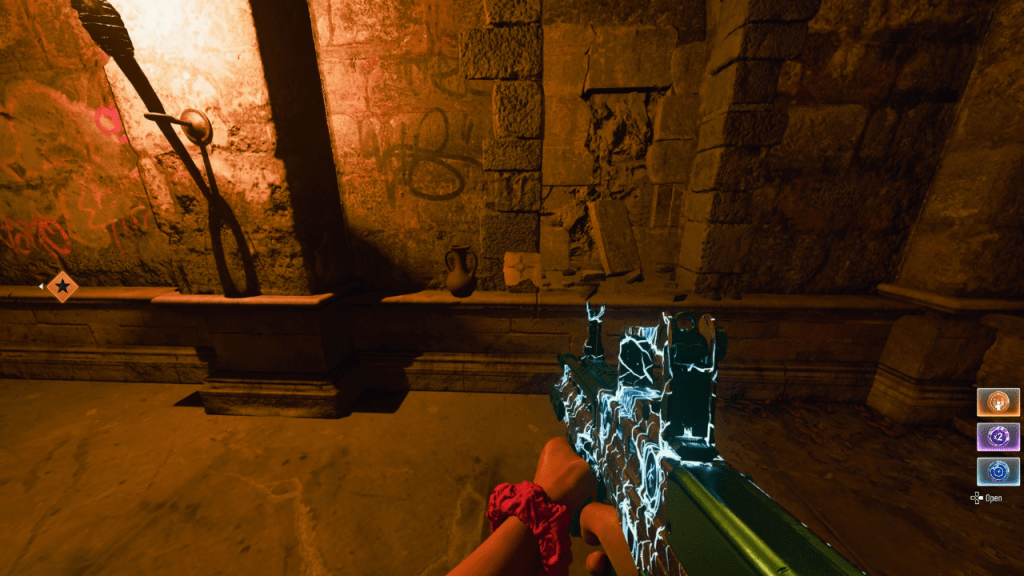 Black Ops 6 の Death Fortress の複数の場所に 4 つのページの断片が表示される場合があります。幸いなことに、これらの可能性のあるスポーン場所はすべて比較的近くにあります。 「スタミナブースト」がある城内のラウンジへ。 4 ページの断片が常にラウンジ自体またはラウンジを囲む通路に表示されます。この断片は、4 つの固有のシンボルの 1 つが印刷された小さな紙のように見えます。これらのページの断片は、多くの場合、ラウンジ内の表面や周囲の棚に表示されます。
死の要塞上の 4 つのページ フラグメントが出現する可能性のあるすべての場所は次のとおりです:
ラウンジ通路のトーチの隣の花瓶の隣、前のスポーン場所の左側、点灯しているトーチと消灯しているトーチの間、通路の廃墟の隅の壁 (トーチの左側)ラウンジの「スタミナ ブースト」 テレビの向かい側のラウンジのソファーに近くに 2 台のテレビがあり、ラウンジの壁の隣に静止画像が表示されます二段ベッドの隣 二段ベッドの隣 二段ベッドの隣 二段ベッドの隣のナイトスタンドの上 二段ベッドの隣の机の上 木箱の隣の床の上 通路の木箱の隣の床の上1 つのトーチの右側にあるロープの束 (トーチの隣に箱の山があります) 他のすべてが失敗した場合は、インタラクション キーを押しながら、ラウンジとその通路のすべての壁に沿って歩きます。このボタンを繰り返し押して放します。しばらくこれを行うと、4 つのページの断片をすべて収集できるはずです。
ページフラグメントの使用方法
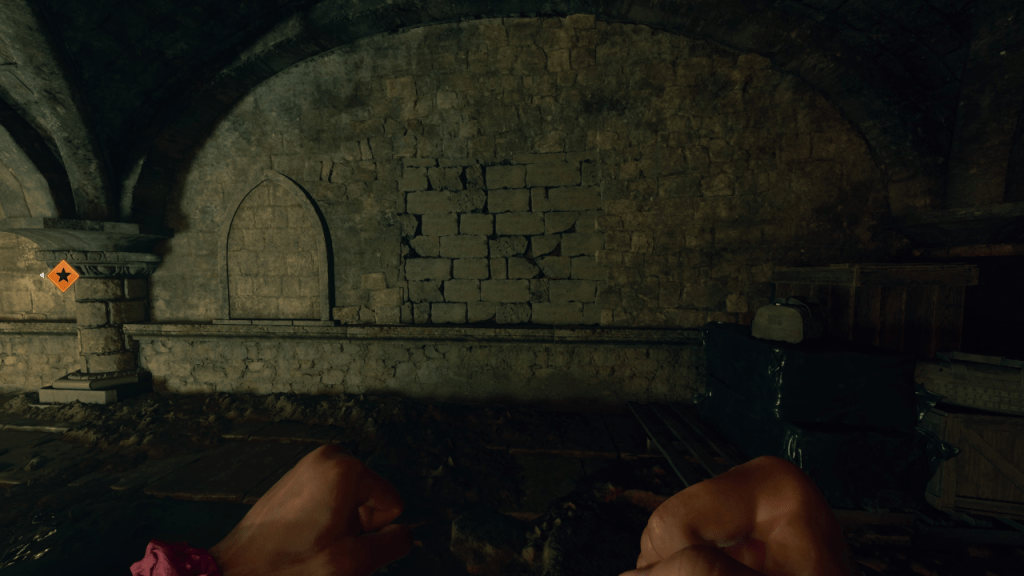 4 つのページ フラグメントをすべて収集すると、イースター エッグのメイン クエストの後半で使用できるようになります。これらのページは、地下エリアの壊れやすい壁の後ろにある本に追加できます。この壁を打ち破るには、近接パワーアップスキル「メレーマキアート」の強力な拳攻撃を使用してください。これにより、解決する必要のあるパズルが明らかになります。パズルを完了すると、赤いオーブが出現します。インタラクション キーを押したまま操作すると、4 つの赤いページすべてが本に追加されます。
記号の順序に注意してください: 左上、左下、右上、右下。各シンボルは、マップ上の「パワー ポイント トラップ」に対応します。左上のシンボルに対応するトラップに移動し、トラップをアクティブにして、トラップが閉じるまでトラップ内で殺します。これが成功すると、本のシンボルは点灯しなくなります。 4 つのトラップすべてに対してこれを順番に実行します。
これは、Black Ops 6 ゾンビ モードの Death Fortress で 4 つのページの断片を見つけて使用する方法です。
![1xBet [Updated]](https://imgs.yx260.com/uploads/76/1719623227667f5e3be7616.jpg)