Berry Avenue – 2025 年 1 月に有効なすべてのコード
Berry Avenue Roblox: 化粧品アイテム コードの引き換えガイド (2024 年 6 月)
Roblox ロールプレイング ゲームの Berry Avenue では、高校生から銀行強盗 (または警察官!) まで、自分の人生を築くことができます。 これらの装飾アイテム コードを使用してアバターをカスタマイズします。 これらのコードは Roblox アイテム ID であり、スタイリッシュな衣類やアクセサリーへのアクセスを許可します。
アクティブな Berry Avenue コード – 2024 年 6 月
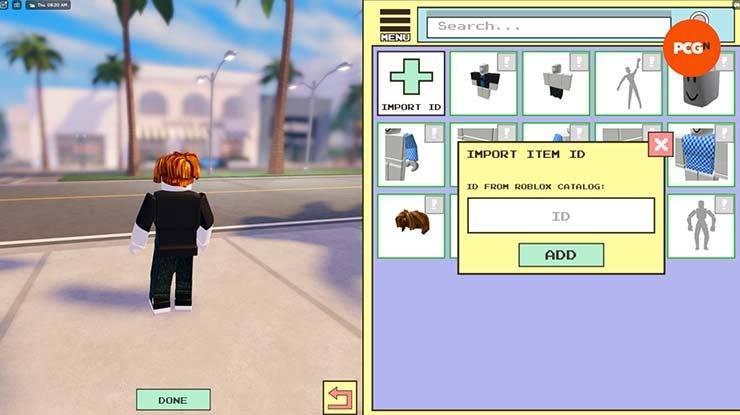
以下は現在アクティブなコードのリストです。 これらは Roblox アイテム ID であり、従来の英数字コードではないことに注意してください。
398633812– 黒のジーンズと白い靴4904654004– 影のある頭16630147– 美しい人々のための美しい髪6275932619– エルフの耳とイヤリング398633584– 白いパーカー付きデニムジャケット616380929– 勝利の笑顔607785314– ロブロックス ジャケット6909081094– ヘッドスライム973731735– カーボードドラゴンテール5829305497– 長袖を見ています706742802– ギャラクティックスペースアディダスパーカー1004377322– ブルーいたずらフェイスパーカー5830798662– かわいいサンハット (レース)4665360748– ハイライト フード3381456332– スクープ アホイ ハット2988778517– ブラックウィドウの警棒398673196– ブロンドのアクション ポニーテール2261475708– レインボーw 想像の風451220849– ラベンダーのアップヘアスタイル5703030397– かわいいキティの包帯2906906446– ロイヤル パーティー ハット562258641– お祝いの冬の色合い3302590751– ギドラの翼6909081094– ヘッドスライムの帽子451221329– トゥルーブルーヘア2956239660– ベルファストの長い赤い髪のベル5945436918– ライトブラウンの優美なヘアスタイル451220849– ラベンダーアップスタイル4849184439– 蝶の帽子7987180607– 大笑い494291269– スーパースーパーハッピーフェイス1005840850– フラワークリップ11599231787– 大きなメガネ12747063945– ピンクトップ12820538476– ポニーテールと前髪のある黒いヘアスタイル6028069475– ジョーダン 23 の黒と緑の衣装6048064692– 黒のトレーニング ブラとオレンジのショーツ6702321297– 赤いパンクガールの衣装6935621784– 黒のパンクガールの衣装8065738784– オレンジバディの衣装10116362781– 赤いヒョウ皮の衣装10252227113– ライラックのラウンジ衣装10768966726– ピンクのナイキ トレーニング アウトフィット12814583904– 美しい顔10913789630– スパイダーマンのスウェットシャツとズボン13472715951– スターヘアクリップ11085620776– アホロートル ピンクのおしゃぶり11095198309– アホロートルブルーのおしゃぶり11771034304– クマのおしゃぶり11804408815– ブラックハートおしゃぶり11095227524– カエルのおしゃぶり13173433386– ハートのヘアクリップ12788134495– お金6202805550– ハートとパールのネックレス11251388730– ピンクのおしゃぶり8780017969– スタッド イヤリング付きのリアルな耳11436322613– 紫のおしゃぶり11712511561– ユニコーンおしゃぶり5508770029– 白いバッグ6238414257– 白い財布9130631127– 白いショーツ11436404858– 黄色のおしゃぶり
コードの引き換え:
- ベリーアベニューを起動します。
- アバターをクリックします。
- 「メニュー」から「装備」を選択します。
- 「ID をインポート」をクリックし、コードを入力します。
- アイテムは自動的に装備されます。 そうでない場合は、コードが無効であるか、アイテム ID が存在しない可能性があります。
トラブルシューティング:
コードが機能しない場合は、タイプミスがないか再確認してください。 一部のアイテムは存在しないか削除されている可能性があります。 アイテムの装備を解除するには、そのコードを再入力する必要があります。 一部の衣装は視覚的に衝突する可能性があることに注意してください。
最新記事
Shadow of the Monkey King: The PS5 Patch That Shakes the System – 93GB Download Warning
The highly anticipated Shadow of the Monkey King—officially titled Wukong—has dropped a major performance patch for PlayStation 5, promising smoother gameplay, enhanced visuals, and improved load times. But fans are bracing for a shock: the update weighs in at a massive 93GB.
What’s New in the Patch?
The latest patch brings significant improvements to the game’s already impressive technical foundation:
Ray Tracing Enhancements: More realistic lighting, reflections, and ambient occlusion across all key environments—from the misty peaks of the Five Elements Mountains to the fiery depths of the Underworld.
Framerate Stability: Fixed stuttering issues in high-combat sequences, ensuring a buttery-smooth 60fps experience in Performance Mode.
Reduced Load Times: Level transitions and fast-travel now load up to 40% faster, thanks to optimized data streaming and expanded SSD utilization.
AI & NPC Improvements: Enemies react more dynamically to player actions, and non-combat NPCs now display more lifelike behaviors and dialogue variations.
The 93GB Download: Why So Big?
While the patch delivers on quality, the 93GB size has sparked mixed reactions online. According to a dev note from Game Science:
“This update includes over 100GB of new assets, including high-resolution textures, additional animation cycles, and expanded audio libraries. The bulk of the data is dedicated to preserving the game's artistic integrity and enabling future mod support through a new asset streaming framework.”
Some users have pointed out that the base game is only ~40GB, meaning the patch nearly doubles the total storage requirement.
What Should Players Do?
Ensure You Have 100GB+ Free Space: The PS5 needs at least 100GB of free space for the full patch installation, including temporary files.
Consider Using a Fast SSD: The patch’s large size and high-speed data transfer mean a fast external SSD or internal NVMe drive is recommended for optimal download and installation times.
Download During Off-Peak Hours: With many players updating simultaneously, expect slower speeds during peak times.
Fan Reactions
The community is split:
“93GB for a game that already looked gorgeous? I’ll take the upgrade.” – @PS5GamerPro
“I’m not mad… I’m just disappointed my 500GB PS5 now has 100GB of ‘just for one game’.” – @GamingWithGrit
“It’s worth it for the ray-traced rain in the Jade Emperor’s palace.” – @MonkeyKingFanatic
Final Thoughts
While the 93GB download is a hefty ask, the performance and visual gains make it a worthwhile investment for fans of Wukong. As one Reddit user put it:
“It’s not a patch. It’s a revelation. Just… maybe start downloading on a weekend.”
So, if you're ready to dive back into the mythic journey of Sun Wukong, grab your staff, clear some storage, and prepare for a transformation—both on screen and on your PS5’s hard drive.
🔥 Wukong has risen. But so has your download bar.
読む
As of now, there is no official confirmation from Netflix or the production team regarding a delay of On Life 2 to February 2026. In fact, there is no publicly known project titled On Life 2 in Netflix’s official content pipeline or major entertainment news sources. It’s possible that the title may be confused with another show, or it could be a fictional or fan-made concept.
If you're referring to On Life, a Netflix series that aired in 2023 (a drama based on the true story of a woman who fakes her death to escape her life), there has been no announcement of a sequel, let alone a release date for 2026.
For accurate updates on TV shows, it’s best to check official sources like:
Netflix’s official website or app
Press releases from Netflix
Reputable entertainment news outlets (e.g., Variety, The Hollywood Reporter, Deadline)
If you meant a different show or have more context, feel free to clarify, and I’d be happy to help!
読む